When to Use Claude vs GPT vs Gemini for Different Business Workflows

The right AI model for your business depends on the workflow you're running. Claude handles long-document analysis and compliance-sensitive drafting. GPT wins on customer-facing automation and external tool integrations. Gemini fits best when your team already lives in Google Workspace. Picking by workflow, not by brand, is how you get ROI from any of them.
Why Most AI Tool Decisions Produce No ROI
You subscribed to an AI tool sometime in the last two years. Maybe two. Your team used it for a few things, inconsistently, and if someone asked you today which workflow runs measurably better because of it, you'd have to think about it for a while. The effort was there. The routing wasn't.
The tool is probably being applied to tasks it wasn't optimized for, which means the output is mediocre, the team loses trust, and the subscription becomes an expense nobody can justify. According to McKinsey's 2025 State of AI report, 72% of organizations have adopted AI in at least one function, but only a fraction report meaningful bottom-line impact. The gap between adoption and ROI is almost entirely a matching problem.
Before you pick a model, answer three questions about the workflow you're trying to improve: What's the task type (document-heavy, customer-facing or internal-operational)? How sensitive is the data (contracts and financials vs. marketing copy)? How deep does the integration need to go (standalone use vs. connected to your CRM, ERP or communication tools)?
Those three axes determine which model fits. If you haven't first confirmed whether a workflow is worth automating at all, start there. Figure out the workflow first. Then pick the model.
Claude Fits Workflows That Live Inside Long Documents
Start with the number: according to Anthropic's model documentation, the current Claude family supports up to a 1M token context window, which translates to roughly 750,000 words or thousands of pages of standard business documents in a single pass. That's an entire vendor contract library, a full employee handbook, or several years of board meeting minutes loaded at once. Most models can't touch that without chunking the input and losing context across chunks.
Where Claude falls short: its plugin ecosystem is more limited than GPT's, and it's not natively embedded in any productivity suite. If your workflow depends on tight CRM integration, Claude may not be the answer. Claude can process a complete supplier agreement and flag non-standard indemnification clauses, unusual liability caps or terms that deviate from your template. Compliance-sensitive drafting covers HR policies, regulatory filings and internal audit documentation. Claude handles the density well and keeps its reasoning consistent across long inputs. RFP response generation works well too: feed it your past proposals and the new RFP requirements, and it drafts responses that pull from your existing language rather than generating generic filler. Internal knowledge base Q&A is another fit. Point it at your operations manual or SOPs and let your team ask questions.
One non-obvious thing about Claude: it tends to hold its reasoning more consistently across extended inputs than GPT does. That matters less for a 10-page contract and a lot more when you're processing 50 of them in a single session.
One important note on data sensitivity: Claude's enterprise tier includes data privacy agreements that consumer-tier API access does not. If the workflow touches sensitive business data, the tier matters.
GPT Fits Workflows That Touch Customers or External Tools
GPT is the right model when the workflow faces outward or needs to connect to your existing software stack. OpenAI's ecosystem of integrations is the most mature of the three. GPT connects to HubSpot, Salesforce, Zapier, Slack and hundreds of other business tools through the OpenAI API and GPT Actions. If the workflow needs to read from or write to an external system, this is where the integration depth pays off.
Specific workflow fits:
Customer-facing chatbots. GPT handles conversational tone well and can be fine-tuned to match your brand voice across support and sales interactions.
Sales email sequences and lead qualification. It can pull CRM data, draft personalized outreach and score leads based on criteria you define.
Support ticket triage. Route incoming tickets by category, urgency and sentiment before a human touches them.
Multimodal tasks. GPT processes text, images and audio natively.
Worth flagging on that last point: GPT's multimodal capabilities are frequently oversold for business use. Most teams end up using it for text-only workflows. The image and audio processing is a nice-to-have, not a driver of ROI for most operations.
Two things to watch: first, consumer ChatGPT and the API have different data handling terms. Don't route sensitive business data through the consumer product. Second, for very large document-analysis workflows, Claude still has a slight edge on reasoning consistency across the full window. For a deeper look at where ChatGPT's strengths end, we've written about ChatGPT's limitations in business contexts separately.
Gemini's Biggest Advantage Is One Most Comparisons Bury
Gemini also supports a 1M token context window. That rivals Claude's document depth and gets almost no attention in most model comparisons.
The native Google Workspace integration is the other piece. Your team drafts proposals in Google Docs, tracks project hours in Sheets and communicates via Gmail. Gemini operates across all three without any data export or API configuration. Claude or GPT would require pulling data out of Google, processing it externally and pushing results back in. That friction cost adds up faster than most teams expect.
Internal reporting, meeting summarization, spreadsheet analysis, email drafting at volume. For teams already inside the Google ecosystem, these workflows don't require a new tool or a new tab. Gemini in Google Meet captures action items and key decisions without a separate transcription tool. Ask questions about your Sheets data and get formula suggestions or pivot table structures back. For teams that send high volumes of email through Gmail, Gemini drafts contextually aware responses without switching tools.
Gemini also has native access to Google Search, making it the strongest option for workflows that need current information: market research, competitor monitoring or news-triggered alerts.
Where Gemini underperforms: document-heavy legal or compliance workflows where Claude's reasoning depth matters, and plugin-heavy external integrations where GPT's ecosystem wins.
The Workflow Routing Matrix
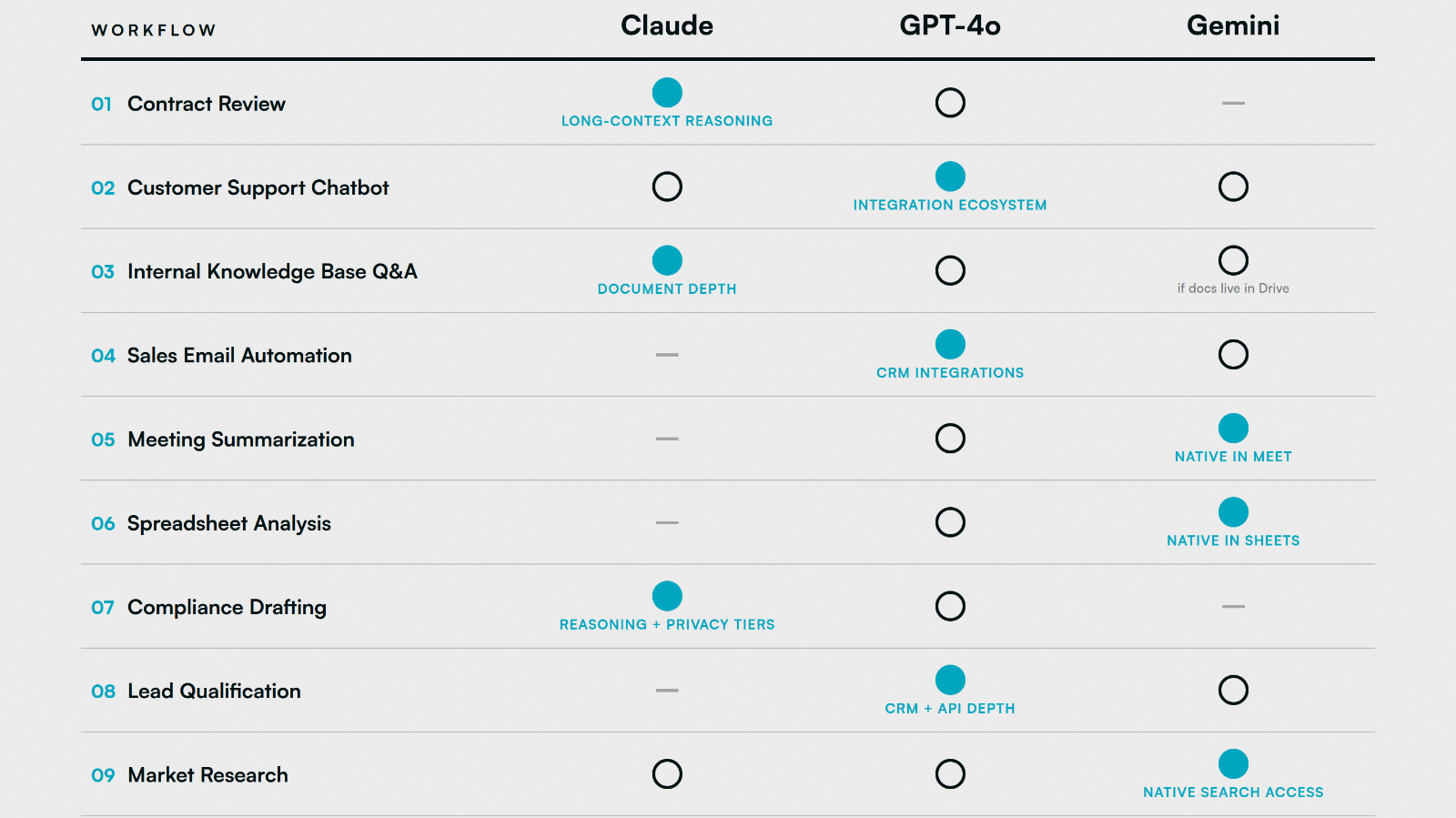
Model capabilities update frequently. Check Hiero AI Hub for current model standings before locking in a stack.
You Probably Don't Need All Three
The goal here isn't to add tools. Most operations leaders we work with land on one primary model and add a second selectively for a specific workflow category their primary can't serve well. Subscribing to all three without a routing plan just multiplies the confusion and the invoices.
The practical framework: identify your highest-volume workflow category and let that determine your primary model.
Professional services and compliance-heavy industries tend to land on Claude as their primary, because the work lives in documents.
Sales-driven or customer-facing businesses tend to land on GPT, because the work lives in CRM and communication tools.
Teams already deep in Google Workspace tend to land on Gemini, because the work already lives there and the friction cost of exporting data to another model isn't worth it.
Add a second model only when you have a specific workflow category your primary handles poorly. If your primary is Gemini but you need contract review, add Claude for that workflow. If your primary is Claude but you need a customer-facing chatbot connected to HubSpot, add GPT for that workflow.
One thing most comparisons skip: for high-volume, low-complexity tasks like email triage or basic summarization, the cheapest model that clears the quality bar wins. Running a flagship model on 10,000 support tickets a month when a lighter tier handles them fine is just burning budget. The "best" model and the right model for a given workflow aren't always the same thing, and cost-per-token math changes fast as you scale.
FAQs
It depends on the workflow. Claude outperforms GPT on long-document analysis and compliance-sensitive drafting. GPT outperforms Claude on customer-facing automation and external tool integrations. Neither is universally better. The workflow determines the answer.
Free tiers work for low-stakes, low-volume tasks. For any workflow touching sensitive business data (contracts, customer records, financial information), you need an enterprise or API tier with a data processing agreement. Running sensitive data through consumer-tier products is a compliance risk most businesses don't think about until it's too late.
Quarterly is a reasonable cadence. Major model updates from Anthropic, OpenAI and Google have been shipping every few months, and capability gaps that existed six months ago may have closed. Hiero AI Hub tracks these updates in real time so you don't have to monitor every announcement yourself.
Some workflows genuinely need a handoff. Using Claude to analyze a contract and GPT to push the output into a CRM is a valid architecture, but it requires an integration layer to manage the handoff cleanly. Off-the-shelf model access isn't enough at that point; you need a custom integration.
Gemini is capable outside of Google Workspace, but its clearest advantage disappears. If your team doesn't live in Docs, Sheets and Gmail, Gemini's native integration benefit doesn't apply, and Claude or GPT will likely serve you better depending on the workflow type.

Written by
Andrew Lay
Andrew Lay is the founder and CEO of Hiero, a Michigan-based development studio that helps businesses use AI, automation, and custom software to improve how they operate. A business strategist specializing in AI, Andrew brings more than 20 years of experience building apps, digital products, and operational systems. His work focuses on the part of AI adoption most companies skip: identifying the right business problem, determining whether AI is actually the right solution, defining a defensible return, and putting the controls and feedback loops in place to protect that return after launch. Andrew is the author of the forthcoming book, Lessons from Bad AI Implementations and How to Guarantee ROI With AI, a practical field guide built from 34 verified failure cases and the Hiero implementation method. He also hosts the Hiero Exclusive podcast and speaks on AI strategy, entrepreneurship, and operational growth.
All posts by Andrew →