
Not every repetitive task deserves a bot. That sounds like something an AI consulting firm shouldn't say, but it's the first thing we tell people who come to us wanting to automate everything. The instinct makes sense. You've got a team doing the same thing over and over, it feels wasteful, and someone on LinkedIn told you AI can fix it. Maybe it can. But "this task is annoying" doesn't mean it's worth automating, and confusing the two is how companies end up spending five figures on an automation that saves ten minutes a week.
A workflow is worth automating when four factors line up: it runs frequently, it eats time, it demands consistency and it doesn't depend on human judgment to get done right. Score high on the first three and low on the fourth, and you've found a candidate. Score high on all four, and you've found a task that should stay with a person, at least for now.
The 4-Factor Scoring Framework
Score each workflow on four factors, rate them 1 through 3, and the total tells you what to do next. A combined score of 10-12 means automate now. A score of 6-9 means pilot it or queue it for later. Below 6, leave it alone.
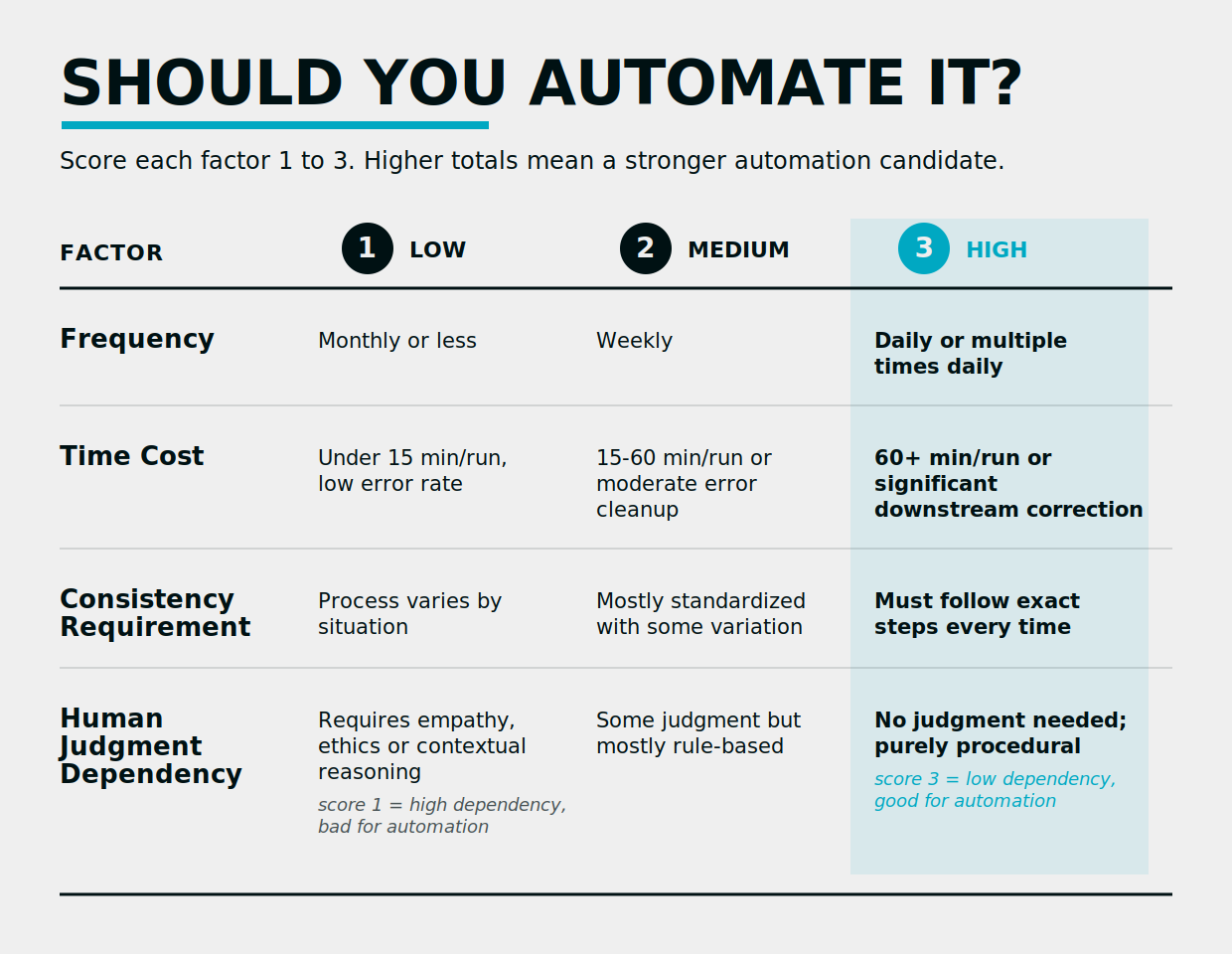
Note that Human Judgment Dependency is scored inversely. A 3 means the task requires almost no discretion, which is what you want for automation. A 1 means it requires real human thinking, which disqualifies it regardless of how the other three factors look.
Frequency: How Often Does This Task Run
Daily or multiple-times-daily tasks score highest because frequency multiplies the value of every other factor. A task that takes 10 minutes but runs 50 times a week is a stronger candidate than one that takes two hours but runs once a month. Consider a manufacturer whose team manually sends order confirmation emails for every inbound purchase order. Each email takes three minutes. At 40 orders a day, that's two hours of someone's time on a task that follows the same template every single time.
Time Cost: What Does Manual Execution Cost
Time cost includes the obvious part (how long the task takes) plus the part most people forget: error correction and downstream cleanup. A workflow with a low error rate but high volume still accumulates significant time cost because even a 2% error rate across hundreds of weekly executions means someone is spending hours fixing things that went wrong. Most COOs undercount this because they measure the task itself, not the ripple effects when it breaks. You can calculate your own number: multiply the time per run by the frequency per week, then add your best estimate of correction time. Multiply that by the fully loaded hourly cost of whoever is doing it. That's your baseline.
Consistency Requirement: Does It Need to Be Done the Same Way Every Time
High consistency requirement is a green flag. If the process must follow the same steps in the same order every time, a machine will outperform a person because machines don't get bored, skip steps, or improvise when they're in a hurry. Compliance-adjacent workflows in professional services, logistics and manufacturing score high here because consistency isn't a preference. It's a regulatory requirement. Invoice processing, quality inspection checklists, customer onboarding sequences with required disclosures. These are workflows where deviation creates liability.
Human Judgment Dependency: Does This Require Discretion
This is the disqualifier. A workflow that requires empathy, contextual reasoning or situational judgment doesn't belong in an automation pipeline regardless of how the other three factors score. The tricky part is that many people running operations overestimate how much discretion their team is applying. A customer service rep who "uses judgment" to route support tickets is often following a mental decision tree that could be written down and automated. That's a classification task, and AI handles classification well. AI-powered automation handles classification, summarization and routing well. It does not handle tasks where the right answer depends on a relationship history that lives in someone's head, or where the ethical stakes require a person to own the outcome.
Workflows That Score High but Still Fail
The framework measures suitability. Readiness is a separate problem.
Consider a distributor whose inventory alert workflow scores perfectly: it runs dozens of times a day, takes significant manual time, must be executed consistently and requires zero judgment. Green lights across the board. But when you dig in, you find that three different team members set alert thresholds differently, none of them documented their logic, and the "standard process" is actually three competing processes that happen to produce similar-enough results most of the time.
Automating that workflow means picking one of the three versions and encoding it. The other two team members will immediately flag exceptions. The automation will fire alerts at thresholds that feel wrong to two-thirds of the people who rely on it. Within a month, someone will build a workaround spreadsheet, and you'll have an automated system running in parallel with a manual one.
The fix is boring: document the workflow before you build anything. If the team can't describe every step, every decision point and every exception in writing, the automation will be built on assumptions. Assumptions break in production.
When Not to Automate
Three situations where you should skip automation entirely, even if the framework score looks promising:
-
High human judgment dependency. Already covered, but worth restating as a hard stop. If the task requires empathy or ethical reasoning, keep a person on it.
-
High process volatility. If the workflow changes shape every quarter because the business is evolving fast, the maintenance cost of keeping the automation current will exceed the cost of doing it manually. Automation rewards stable processes. Unstable ones eat your engineering time.
-
No maintenance capacity. Automation is not set-and-forget. Someone has to own it when it breaks, and it will break. If your team doesn't have the bandwidth to monitor, debug and update the automation after launch, you'll end up with a broken bot that everyone routes around.
The cost calculation for mid-market companies has to include build time, maintenance time and the cost of errors during the learning period. A simple Zapier trigger that handles 80% of cases is often a better investment than a complex custom flow that handles 100% but requires a developer to maintain. Over-engineering is a real failure mode, and it's more common than under-engineering in companies that get excited about AI-powered automation in business operations.
For workflows where the ROI case is unclear or the process needs strategic consulting before committing to a build, that's a sign to slow down, not speed up.
How to Prioritize When You Have Multiple Candidates
Most companies doing $5M to $50M in revenue have more automation candidates than bandwidth to build them all at once. The prioritization rule is straightforward: start with the workflow that has the highest combined Frequency and Time Cost score, because that's where time savings compound fastest.
Secondary consideration: pick a workflow with low exception risk for your first build. If the first automation succeeds cleanly, the team trusts the next one. If the first automation breaks in week two because of an edge case nobody anticipated, you'll spend six months convincing people to try again.
Michigan manufacturing and logistics operations tend to have high-frequency, high-volume workflows that fit this model well. Order processing, inventory alerts, quote follow-ups. These are tasks that run constantly, follow predictable patterns and don't require the person doing them to make judgment calls. They're also the tasks where the person doing them is usually overqualified for the work, which means automation frees them to do something more valuable.
A workflow audit is the fastest way to surface the highest-priority candidates across an operation. You can do it yourself with the scoring table above, or you can have someone do it for you. If you want to move from scoring to building, the companion piece on automating your small business step by step covers the execution side.
FAQs
A workflow is a strong automation candidate when it runs frequently, takes significant manual time, must be executed consistently and does not require human judgment or discretion to complete. Workflows that score high on the first three factors and low on the fourth are the ones worth building on first. If the process also has low exception risk and is well-documented, it's an even stronger candidate.
The math is simpler than most people make it. (Which is saying something, because most people overcomplicate it.) Multiply the time the task takes manually by how often it runs per week, then multiply by the fully loaded hourly cost of the person doing it. Add in the estimated cost of errors and downstream correction time. Compare that annual total to the build cost plus estimated maintenance time for the automation. If the payback period is under 12 months, the ROI case is strong. Over 18 months, pressure-test your assumptions before committing.
Partially, and the distinction matters. AI-powered automation handles judgment-adjacent tasks like classifying incoming requests, summarizing documents or routing tickets based on content. It cannot reliably handle tasks that require empathy, ethical reasoning or contextual decisions that depend on relationship history. That's the reason the Human Judgment Dependency factor exists in the scoring framework, and it's the line that separates rule-based automation from something that still needs a person in the loop.
Document the workflow in writing before building anything. Every step, every decision point and every exception. If the team can't produce that document, the automation will be built on assumptions that will fail in production. Fixing the process on paper first is faster and cheaper than debugging a broken automation after it ships. Most failed automation projects we see skipped this step.

Written by
Andrew Lay
Andrew Lay is the founder and CEO of Hiero, a Michigan-based development studio that helps businesses use AI, automation, and custom software to improve how they operate. A business strategist specializing in AI, Andrew brings more than 20 years of experience building apps, digital products, and operational systems. His work focuses on the part of AI adoption most companies skip: identifying the right business problem, determining whether AI is actually the right solution, defining a defensible return, and putting the controls and feedback loops in place to protect that return after launch. Andrew is the author of the forthcoming book, Lessons from Bad AI Implementations and How to Guarantee ROI With AI, a practical field guide built from 34 verified failure cases and the Hiero implementation method. He also hosts the Hiero Exclusive podcast and speaks on AI strategy, entrepreneurship, and operational growth.
All posts by Andrew →